See exactly where your URLs cannibalize each other — in plain English.
Drop in a GSC export (CSV or XLSX). We group competing pages, quantify the click split, flag unstable rankings — and tell you whether to consolidate, canonicalise, or differentiate.
 by Lukasz Zelezny and SEO.London
Create the dataset you'll use for cannibalization analysis
Search Console alone won't show you cannibalization
Search Console shows queries and pages in separate lists, capped at ~1,000 rows — so you never see which page took which query. That pairing is exactly what cannibalization analysis needs.
Our ready-made Looker Studio report pulls the Query + Landing Page pair straight from the Search Console API — up to 750,000 rows. Export as CSV, drop it in here, done.
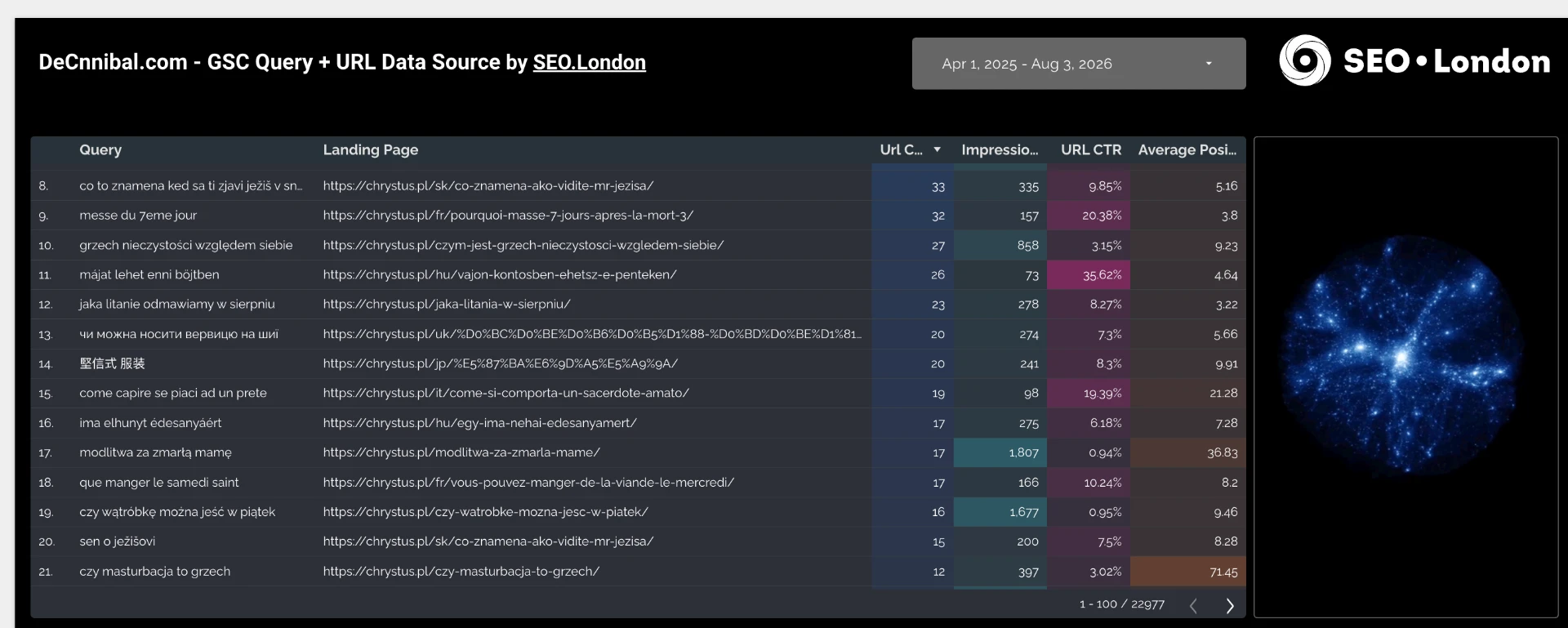
Every keyword sits next to the exact landing page that ranked for it — the pairing the Search Console UI hides.
Pulled through the API instead of the ~1,000-row UI export, so long-tail overlap isn't cut off.
Impressions, URL clicks, CTR and average position per pair — everything the clustering engine scores on.
Yup... we know we could add Search Console straight away, but... we are too lazy to be a verified developer. So for now... workaround.
Drop your Search Console (Data Studio) CSV export here
Drop your Search Console (Data Studio) CSV or XLSX export here
click to browse
Not sure you exported the right file? Download a sample Data Studio CSV